

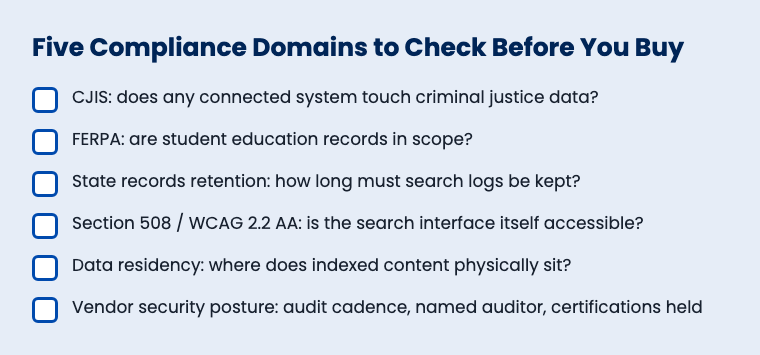
A workplace search compliance checklist has to answer three questions before procurement ever reaches a contract: does the tool touch criminal justice data governed by CJIS, does it touch student records governed by FERPA, and can it satisfy your state's records retention schedule for search logs and audit trails. Most vendor security pages answer none of the three directly. This checklist gives you the questions to ask, organized by the three compliance domains that actually show up in a SLED procurement review, plus the records retention and accessibility checks that ride along with them.
Direct answer
Before buying internal search or AI answer-engine software for a government agency or university, confirm the vendor publishes (1) how it handles CJIS-touching data if any connected system includes criminal justice records, (2) how its permission model satisfies FERPA when student education records are in scope, and (3) how long its audit logs are retained and whether that period matches your state's records retention schedule. If a vendor can't answer all three in writing, that's your answer too.
Nobody selling workplace search wants to open this conversation first. A county IT director doesn't want to admit her SharePoint tenant has a sheriff's department folder sitting three clicks from a general-access group. A university compliance officer doesn't want to discover, mid-pilot, that the "internal search" tool indexed FERPA-protected advising notes into a dashboard three departments can see. These aren't hypotheticals. They're the exact findings that show up in the first 90 days of a workplace search rollout, and the checklist below is built to surface them before go-live instead of after a complaint.
Why this checklist exists: the gap every major vendor leaves open
Run a search on how Glean, Amazon Q Business, or Sinequa talk about government compliance, and a pattern shows up fast: they talk about everything except the three things a state agency or university actually needs.
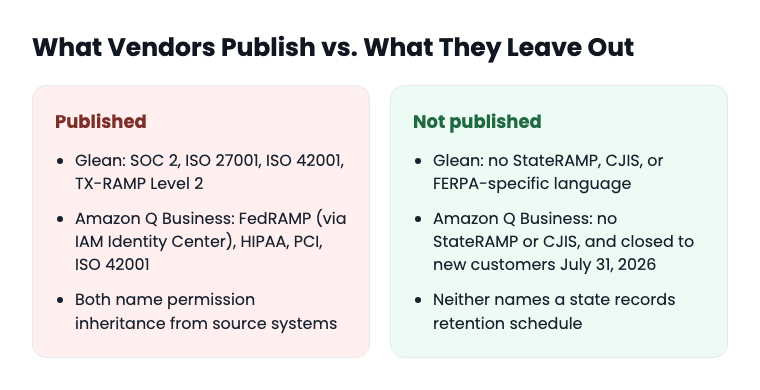
Glean holds SOC 2, ISO 27001, ISO 42001, and HIPAA, and carries TX-RAMP Level 2, a Texas-specific state authorization. That's a real credential, but it stops at the Texas border. Nothing in Glean's published security material names StateRAMP, CJIS, or FERPA. A records manager in Ohio or a university compliance officer in Michigan reading Glean's security page will not find language addressing either of those frameworks at all.
Amazon Q Business published a dedicated public-sector security post naming FedRAMP (through a pre-built identity-center framework), HIPAA, PCI, and ISO 42001. That's a long list, and it makes the omission more obvious, not less: StateRAMP and CJIS never appear in that post, despite it being written specifically for public-sector buyers. FedRAMP covers federal agencies. It does not automatically satisfy a state agency's StateRAMP requirement or a police department's CJIS obligation, and procurement officers who know the difference will notice the gap immediately. Amazon Q Business also stopped accepting new customers on July 31, 2026, which matters if your agency is mid-evaluation and was counting on that compliance story.
Sinequa's pitch runs the other direction: air-gapped, on-premises deployment for "regulated enterprise environments where no third-party cloud data storage is permitted." That's a real differentiator for defense contractors and pharmaceutical companies. It's not built around state records law, CJIS case-management search, or FERPA. A county clerk reading Sinequa's materials finds nothing speaking to her specific regulatory world.
None of this means those vendors are hiding something or doing anything wrong. It means their published content was written for a different buyer. This checklist was written for yours.
Domain 1: CJIS, if any connected system touches criminal justice data
CJIS, the Criminal Justice Information Services Security Policy, governs how criminal history record information, warrant data, and related law enforcement records get accessed, transmitted, and stored. It applies the moment a workplace search tool indexes a system that holds any of that data, even if the search tool itself was bought for HR or general administrative use.
The question that gets missed: does your workplace search connector reach into a records management system, a case management platform, or a shared drive that a detective division also uses? If yes, every one of these needs a documented answer before signing:
CJIS questions to ask
Does the vendor's audit logging meet CJIS Security Policy's minimum one-year retention requirement for audit records?
Does the search index enforce role-based access at the record level, not just the folder level, for any connected criminal-justice system?
Is encryption in transit and at rest documented against CJIS's specific technical requirements, not just described as "industry standard"?
Does the vendor name a specific CJIS authorization, or does it describe CJIS-aligned controls without claiming the authorization itself? Those are different statements, and a records manager needs to know which one she's getting.
Be precise here, because vendors often aren't
Keyspider does not hold CJIS authorization, StateRAMP authorization, or FedRAMP authorization, and no workplace search vendor should be taken at their word if they claim otherwise without a named auditor and a certificate number you can verify independently. What Keyspider can document: NIST 800-53 aligned architecture, role-based access control that mirrors the source system's permissions at the index level, and full audit logging of searches and result clicks. That's a documented security posture. It is not a certification, and the distinction matters to anyone reviewing a CJIS-adjacent procurement.
Domain 2: FERPA, when student education records are in scope
FERPA, the Family Educational Rights and Privacy Act, restricts disclosure of personally identifiable information from a student's education record. For a university rolling out workplace search across advising notes, financial aid files, disciplinary records, and faculty shared drives, FERPA isn't a background consideration. It's the primary compliance question, because the whole point of workplace search is surfacing content across every connected system, and advising notes live right next to HR files in most university SharePoint tenants.
The checklist a compliance officer should run before a university-wide rollout:
FERPA questions to ask
Access control inheritance
Does the search tool respect the same FERPA-restricted access groups that already exist in the source system (the student information system, the LMS, departmental drives), or does it create a new, separate permission layer that has to be independently audited?
Directory information exceptions
FERPA allows disclosure of designated "directory information" without consent, but every other student record requires either consent or a specific legal exception. Does the vendor's documentation distinguish between the two, or does it treat all student-related content the same way?
Audit logging for access requests
FERPA gives students the right to know who has accessed their education records. Can the vendor produce a log showing which employee searched for or viewed a specific student's record, and when?
Third-party disclosure language
FERPA restricts redisclosure of education records to third parties. Confirm the vendor's data handling terms explicitly address this, not just general data processing language.
Keyspider documents FERPA- and CIPA-aligned access controls and audit logging for education use cases: permission-aware indexing and a full audit trail of every search and click. That's the architecture a FERPA review wants to see. It's not a FERPA certification, because FERPA compliance is an institutional obligation, not a vendor credential a company can earn and display. Any vendor claiming to be "FERPA certified" is using language that doesn't correspond to how the law actually works.
Domain 3: state records retention for search logs and audit trails
This is the domain every vendor's compliance page skips entirely, and it's the one a records manager cares about most. State records retention schedules specify how long different categories of government records, including technology system logs, must be kept before they can be destroyed. The rules differ by state, and they differ again depending on whether CJIS or FERPA data is involved.
A few concrete reference points, not a universal rule, because there isn't one: the Texas State Library and Archives Commission's Records Retention Schedule sets a two-year minimum for many general state agency records. California Government Code Section 34090 sets a two-year minimum for local agency records before a governing body can authorize destruction. CJIS Security Policy version 5.9 requires a minimum one-year retention for audit records tied to criminal justice information systems. New York's Arts and Cultural Affairs Law commonly defaults to six years for many state agency record categories. University FERPA-related access logs frequently get retained five years or longer under institutional policy, separate from any state statute.
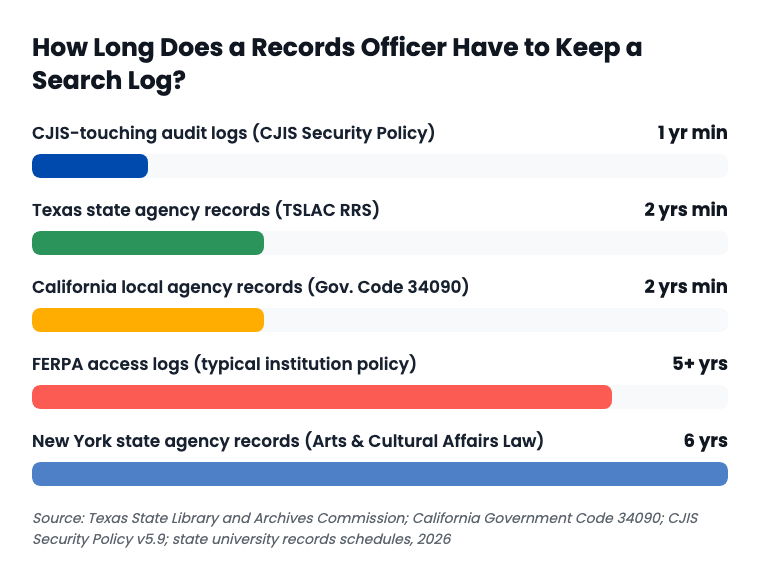
The procurement-level question this creates: does the vendor's audit log retention period meet or exceed your specific state's minimum, and can the agency export that log before the vendor's own retention window closes it out? A vendor that only keeps 90 days of search logs is a liability in a state requiring two years, no matter how good the search results are. Ask for the vendor's log retention period in writing, in days, not in a marketing phrase like "extended retention available."
Keyspider's audit logging covers every search and result click across all 40-plus connected systems, documented specifically to support state records retention requirements. That's a stated design goal. It is still the agency's own records officer, not the vendor, who determines which retention schedule governs a specific log category, and that determination should happen before signature, not after an open-records request arrives.
How permission inheritance and audit logging actually map to a records request
Here's the mechanism records officers need, stated plainly instead of left as a vendor claim: when a source system like SharePoint, Google Drive, or Confluence sets a permission on a document, a permission-aware search index mirrors that permission at query time, not on a nightly batch job. Every search a user runs and every result they click gets logged with the user's identity, the query, and the result. When a records request or a legal discovery request lands on a records officer's desk, that log is the artifact that answers "who could see this document, and when."
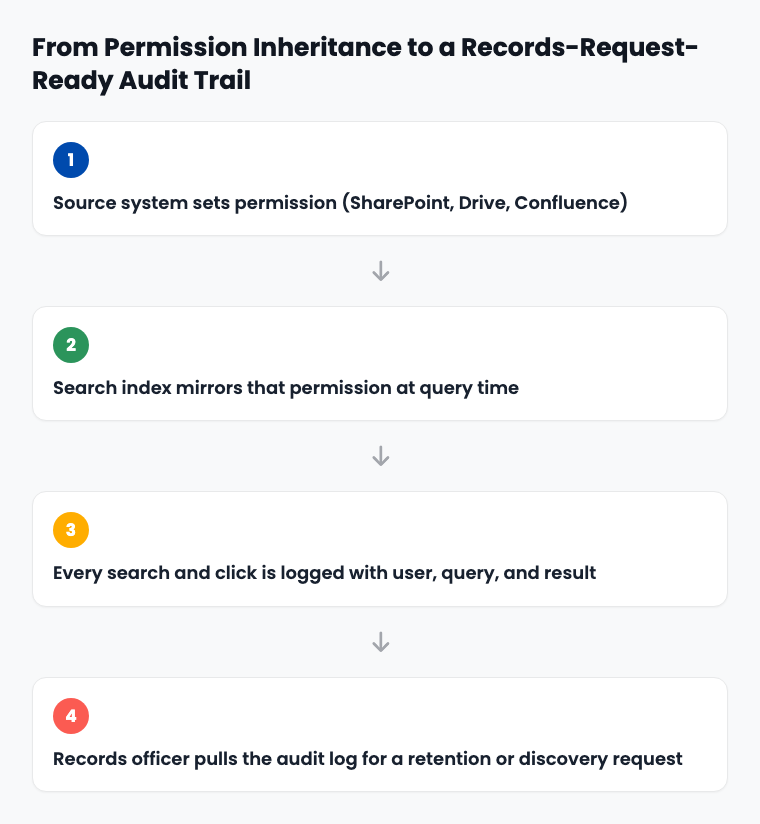
Three things can break this chain, and a compliance review should test for all of them. First: does the permission change propagate to search results in minutes, or does it wait for a scheduled reindex, during which a document someone just lost access to is still searchable? Second: is the audit log queryable by document, by user, and by date range independently, or only as a bulk export that someone has to manually filter? Third: does the vendor's own retention period for that log outlast your state's minimum, or does the vendor silently purge logs on a shorter cycle than your agency is legally required to keep them?
This is also where the sharpest form of the oversharing problem shows up. A search tool that faithfully inherits a bad SharePoint permission from 2019 will faithfully surface whatever that permission exposes, criminal-justice-adjacent or FERPA-protected content included. Permission inheritance is not a substitute for a clean source-system permission structure. It's a mirror, and a mirror reflects whatever is actually there. Before trusting any vendor's access-control claims, run the SharePoint permission audit checklist against your own tenant first.
Accessibility and data residency: the checks that ride along
Two more items belong on this checklist, not because they're CJIS or FERPA issues directly, but because they show up in the same procurement review and get missed when the conversation is dominated by compliance frameworks.
Section 508 and WCAG 2.2 AA
If the search tool itself is inaccessible to an employee using a screen reader, the organization has created a new ADA Title II and Section 508 problem on top of whatever compliance gap it was trying to close. Confirm the search interface, not just the underlying content, meets WCAG 2.2 AA.
Data residency
Confirm where indexed content physically resides. US-based data residency is a baseline expectation for most SLED procurement, and it's worth getting in writing rather than assuming. Avoid any vendor conversation that won't name a residency commitment directly; "we use a leading cloud provider" is not an answer, and a vendor unwilling to name its data residency policy at all is not one you should be shortlisting.
Keyspider documents WCAG 2.2 AA and Section 508 compliance for its search interface, meeting ADA Title II's 2027-2028 compliance deadlines, and commits to US-based data residency. An independent third-party security audit runs annually. None of that is a substitute for the specific CJIS or FERPA review your agency's legal counsel needs to run on your actual connected systems. It's the baseline that should exist before that review even starts.
The full checklist, in order
List every system the workplace search tool will connect to, and flag which ones touch CJIS or FERPA data.
For any CJIS-adjacent system, get the vendor's audit log retention period in writing and compare it against CJIS Security Policy's one-year minimum.
For any FERPA-adjacent system, confirm the search tool inherits existing access restrictions rather than creating a new, separately-audited permission layer.
Confirm whether the vendor claims a specific authorization (StateRAMP, CJIS, FedRAMP) or describes aligned controls without claiming the authorization itself. Verify any claimed authorization independently.
Get the vendor's audit log retention period in days, in writing, and compare it against your state's specific records retention schedule for the record category involved.
Confirm the audit log is queryable by document, user, and date range, not just available as a bulk export.
Confirm how fast a permission revocation on the source system propagates to search results: minutes, hours, or next scheduled reindex.
Confirm the search interface itself meets WCAG 2.2 AA and Section 508, not just the underlying indexed content.
Get the vendor's data residency commitment in writing, named specifically, not described generically.
Ask whether the vendor has undergone an independent third-party security audit, how often, and whether a named auditor is available on request.
Related reading
The SharePoint Permission Audit Checklist
What to fix in your source systems before any permission-aware search tool can be trusted to inherit them correctly
Copilot Didn't Leak Your Data. Your SharePoint Permissions From 2019 Did.
The incident-level version of why permission inheritance isn't a security fix on its own
Four Governors, One Month, Four AI Executive Orders
How the 2026 wave of state AI executive orders is already reshaping what internal AI tools agencies are allowed to buy
Higher-ed compliance officers dealing with the FERPA domain above should also see why university departments can't stay siloed much longer, since the same decentralized SharePoint and Drive sprawl that creates the FERPA exposure risk is the thing breaking down student service response times campus-wide.
This checklist pairs with Keyspider's Government Knowledge Crisis whitepaper on the institutional-memory side of the problem, and with the Government AI Chatbot Procurement Checklist if your agency is evaluating a citizen-facing AI chat tool alongside internal search. Universities specifically should also review Keyspider's higher education page for how permission-aware search applies across decentralized college IT environments.
See how Keyspider holds up against this checklist
Our team will walk through the audit logging and access-control architecture of Keyspider's permission-aware Workplace Search directly, including what we don't claim.
Book a DemoFrequently asked questions
Does Keyspider hold CJIS, StateRAMP, or FedRAMP authorization?
No. Keyspider does not hold CJIS authorization, StateRAMP authorization, or FedRAMP authorization. What Keyspider documents is a NIST 800-53 aligned architecture, role-based access control that mirrors source-system permissions, full audit logging, and an annual independent third-party security audit. Agencies with a CJIS or StateRAMP authorization requirement should confirm that distinction with any vendor before procurement, not after.
Is Keyspider FERPA certified?
There's no such thing as FERPA certification for a vendor, because FERPA compliance is an institutional obligation under federal law, not a credential a company earns. Keyspider documents FERPA- and CIPA-aligned access controls and audit logging for education use cases. The university itself remains responsible for its own FERPA compliance program.
How long does Keyspider retain search and audit logs?
Keyspider's audit logging covers every search and result click across all connected systems, documented specifically to support state records retention requirements. The exact retention period an agency needs should be confirmed against its own state's records retention schedule during procurement, since that schedule varies by state and by record category.
What's the difference between a vendor saying its architecture is "CJIS-aligned" and a vendor being "CJIS authorized"?
"Aligned" describes a design posture, the kind of controls a vendor has built. "Authorized" means an independent assessor has formally certified the vendor against the CJIS Security Policy and issued that authorization. The two statements are not interchangeable, and a records manager should ask a vendor to be explicit about which one applies.
Does a permission-aware search tool fix bad SharePoint or Google Drive permissions?
No. A permission-aware index inherits whatever access control already exists on the source system. If a folder is overshared upstream, the search tool will faithfully surface what that folder exposes. Run a permission audit on the source systems before or alongside a workplace search rollout, not after.
Who should own this checklist inside the organization, IT or records management?
Both, working from the same document. IT can answer the technical questions about connectors, indexing speed, and access-control architecture. Records management and legal counsel are the ones who know which retention schedule applies and whether a CJIS or FERPA review is required for a specific connected system.