

Most workplace search RFPs still read like it's 2014. They ask about crawl speed, connector counts, and uptime. Fine questions. Just not the ones that catch a vendor who can't actually enforce your access controls or produce an audit log when your records officer asks for one.
The short answer: a workplace search RFP needs questions that test three things a sales deck won't volunteer: whether permissions are enforced at query time instead of batch-synced overnight, whether every search and click is logged in a way your state's records retention schedule can use, and whether the vendor names your actual compliance requirements (CJIS, FERPA, state public records law) instead of a vague "enterprise-grade security" line. Ask those three categories first. Everything else is detail.
Procurement tip
Score every vendor response on a 1-4 scale, not pass/fail. A vendor who names FERPA but can't describe audit log retention is a 2, not a 4. You'll want that gradient when you're comparing three bids that all technically "meet requirements."
Why generic site-search RFP language doesn't work here
Your organization has probably run an RFP for public-facing website search before. Different animal. Keyspider's SLED procurement checklist is built for that one: visitor-facing search, no login, no permission model to speak of.
Workplace search is internal. The documents behind it carry real access restrictions, HR files, case management records, legal holds, HIPAA-covered health data in some agencies. A vendor who aces a public-search RFP can still fail badly at the thing that actually matters for internal search: respecting who's allowed to see what. Keyspider's Workplace Search is built specifically around that permission problem, and this question bank mirrors the exact criteria a SLED buyer would use to evaluate it, or any competing platform, line by line. State agencies, counties, school districts, and universities each carry their own flavor of this requirement, which is why Keyspider's SLED industry page treats permission-aware internal search as a distinct line item from public-facing search.
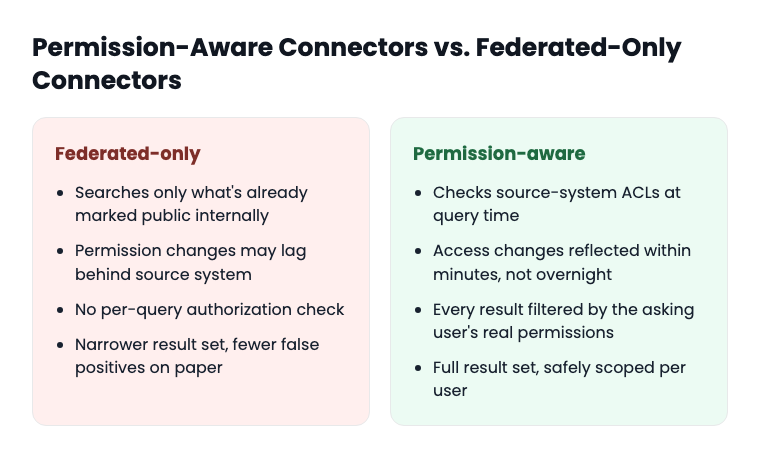
That distinction, permission-aware versus federated-only, is now the line vendors get sorted by. Not a nice-to-have anymore. It's the baseline the market expects in 2026, and most RFPs haven't caught up to ask about it directly. Gartner's first-ever Magic Quadrant for Enterprise AI Search, published in October 2026 (coverage via Elastic's analyst recognition post), treats this capability as table stakes for the whole category rather than a vendor differentiator, a shift worth reading about before you finalize evaluation criteria.
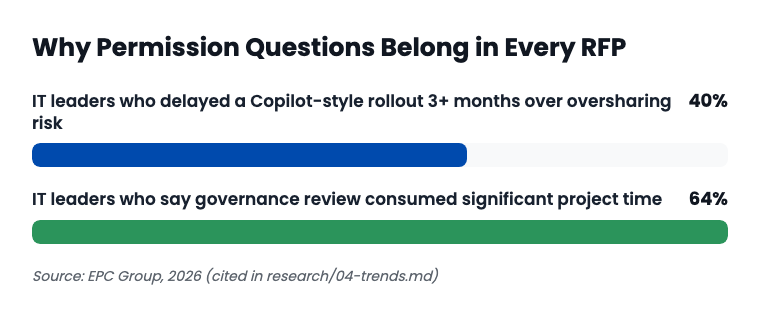
The most visible version of this problem right now runs through Microsoft 365 Copilot licensing. Agencies that bought Copilot seats expecting instant internal search coverage are finding adoption stalled well below projections, partly because Copilot's permission model was never the thing being evaluated at purchase time. Your RFP is the chance to evaluate it before the purchase order, not after.
The 6 categories your RFP needs
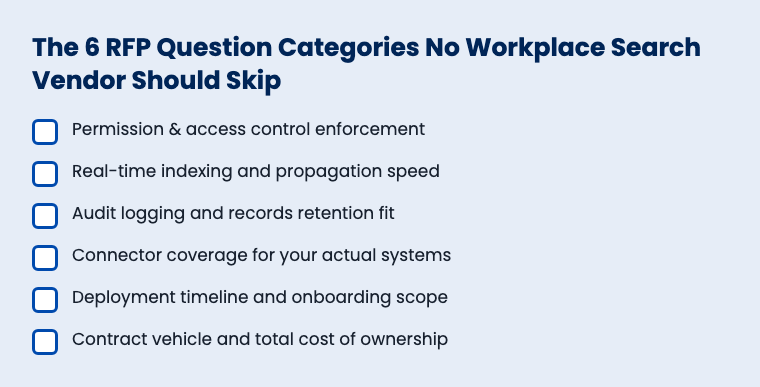
1. Permission and access control enforcement
This is the category that separates vendors who talk a good game from vendors who've actually built the thing.
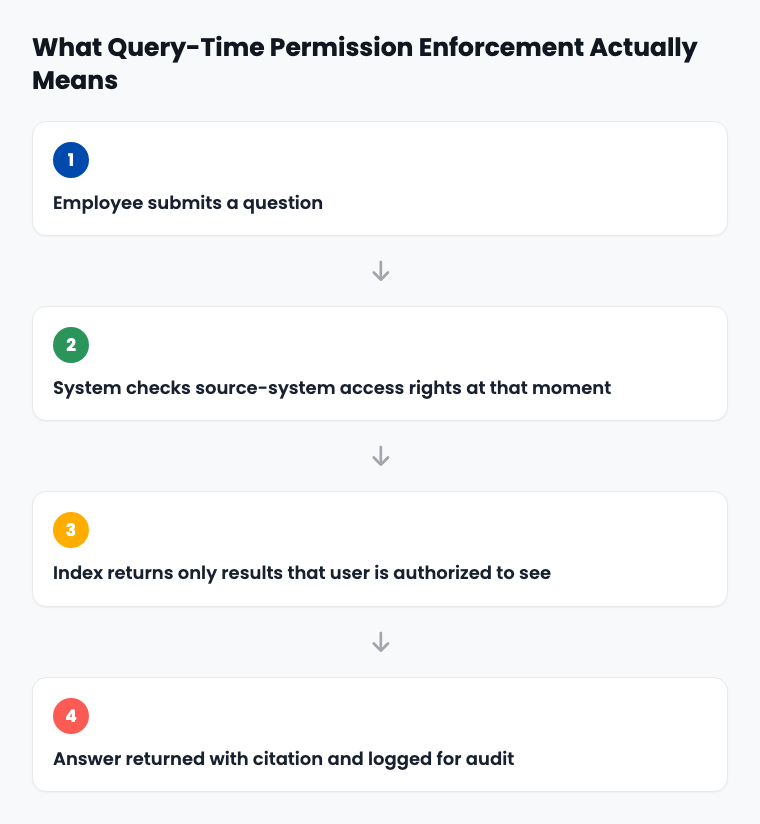
- Describe exactly how your platform enforces source-system permissions at query time versus at index time. If there's a gap between the two, how long is it?
- If a user's SharePoint or Drive access is revoked at 9:00 a.m., when does that change take effect in search results? Minutes? Hours? Overnight batch?
- Walk through what happens when a document's permissions change mid-indexing. Does the old, over-permissioned version ever get served to a user who shouldn't see it?
- Does your platform distinguish between "this file exists and is findable" versus "this file's full content is readable"? Some vendors show a result title to everyone and gate content separately. Ask which model you're getting.
Red flag
Any answer that includes the phrase "role-based access control" without a follow-up explanation of when that control is checked. RBAC at index time and RBAC at query time are different products wearing the same marketing language.
2. Real-time indexing and propagation speed
A permission-aware platform that takes three days to notice a new document is still permission-aware. It's also useless for the "I need this policy right now" use case that justified the purchase.
- What's your typical lag between a document change and that change appearing in search results?
- Does indexing speed vary by connector? SharePoint often lags behind simpler sources.
- How do you handle a 10,000-document bulk upload, say, after a department migration? Does normal indexing pause while that processes?
3. Audit logging and records retention fit
This is the category that gets ignored until a records request lands on your desk and nobody can answer it.
- Does the platform log every search query, every result click, and tie both to an authenticated user identity?
- How long are logs retained by default, and can that retention period be configured to match your state's public records schedule? NIST's audit and accountability control family (AU-11) is the baseline most state IT security policies borrow from, even when the state hasn't adopted NIST 800-53 wholesale.
- Can an administrator export logs in a format usable for a records request or an internal investigation, without vendor involvement?
- If an employee searches for something they shouldn't have access to and the system correctly blocks the result, is that attempt itself logged? (It should be. That's the kind of event your CISO wants visibility into.)
4. Connector coverage for your actual systems
Skip the generic "how many connectors do you support" question. Ask about your systems by name.
- Do you have a production connector for your specific SharePoint version, your specific HR system, your specific case management platform, or would this be custom-built?
- For any custom connector, what's the actual build timeline, and is it a fixed quote or time-and-materials?
- Does your Google Drive connector respect shared-drive permissions the same way it respects individual file sharing, or only one of the two?
5. Deployment timeline and onboarding scope
Vendors love to answer this one in the abstract ("typically 2-4 weeks"). Pin it down.
- What does the deployment timeline look like specifically for an organization with your department count, your document volume, your system list?
- Who does the connector configuration: your IT staff, the vendor's team, or both? How many hours of your staff's time does that realistically take?
- What happens after go-live if we add a new department or a new source system six months in? Is that a change order, or part of the base contract?
6. Contract vehicle and total cost of ownership
The question nobody wants to ask out loud in a bid meeting but every procurement officer needs answered on paper: can we actually buy this the way we buy everything else?
- What cooperative purchasing vehicles can we use to procure this without running a full competitive RFP from scratch? Keyspider itself is available through NASA SEWP V, NASPO ValuePoint (active across all 50 states), OMNIA Partners, TIPS, and Sourcewell.
- Is pricing published, or is it quote-only? If quote-only, how long does a formal quote typically take once seat counts are confirmed?
- Does the quote bundle workplace search with other products you don't need, or can it be priced standalone?
These cost and purchasing-path questions aren't unique to workplace search. Keyspider's 2026 SLED AI procurement trends report tracks the same opaque-pricing pattern across site search and AI chat RFPs this budget cycle, and the fix is the same: ask for the number in writing before you shortlist anyone.
What auditors ask
Not "did you get the lowest price," but "did you document that you evaluated against a defined set of criteria before selecting a vendor." This question bank, filled out and scored, is that documentation.
Scoring vendor answers
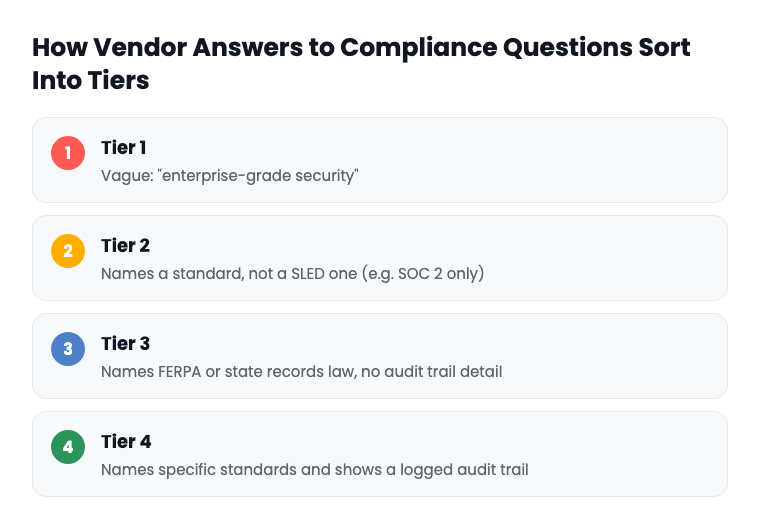
A pattern shows up across the market research behind this question bank: several of the largest workplace search vendors have compliance pages that name federal-style standards (SOC 2, HIPAA, even FedRAMP) and then go quiet on state-specific requirements. One major cloud vendor's public-sector security post names HIPAA, PCI, and ISO 42001 but never mentions StateRAMP or CJIS. Another's compliance story tops out at a single state's authorization program and stops there. Neither gap is disqualifying by itself. But if your agency handles CJIS-regulated case data or FERPA-covered student records, "we have SOC 2" is not an answer to the question you actually asked.
Score every response on the Tier 1-4 scale above, category by category, and total it. The vendor with the highest total, not the lowest sticker price, is the one who already built for your constraints instead of asking you to accept their generic enterprise defaults.
For the deeper walk-through of what to check in your organization's own systems before any of these connectors go live, see the SharePoint permission audit checklist. And if your evaluation needs to go further than the RFP stage, into head-to-head scoring against a short list of vendors, the Workplace Search buyer's guide picks up from here.
A short, real-world framing
Picture a county of 40,000 residents running HR, a case management system for child services, and a decade of policy PDFs on a shared drive nobody has fully indexed since 2016. The county IT director gets three bids back. All three say "secure." Only one can answer, specifically, how a caseworker's access to a sealed case file is checked at the moment they type a question into search, not at the moment the document was first indexed. That's the vendor who actually read the RFP. This is a hypothetical scenario, not a named deployment, but it's the shape of the decision procurement officers are making this budget cycle.
See how this plays out with Keyspider
Keyspider's Workplace Search is built around the exact enforcement model this question bank tests for: permissions mirrored from your source systems, real-time indexing, and a full audit trail of searches and clicks. Book a demo and bring this question bank with you. Ask us every one of these questions live.
Related reading
Internal Search Security & Compliance Checklist
the deeper compliance walkthrough for CJIS, FERPA, and records retention
The Workplace Search Buyer's Guide
what to do after the RFP narrows your list to three vendors
Four Governors, One Month, Four AI Executive Orders
how 2026's state AI policy wave affects what you're allowed to procure
Ready to evaluate Keyspider against this question bank?
Our SLED team will answer every category above in writing before the demo, not during it.
Book a 30-Minute DemoFrequently asked questions
Does a workplace search RFP need to mention StateRAMP specifically, even if our state doesn't require it yet?
Ask the question regardless. A vendor's answer, even "we don't hold that authorization," tells you where they stand relative to competitors who do, and whether they're being straight with you about gaps.
Should permission-aware search questions go in the technical section or the security section of the RFP?
Both. Put the mechanics (query-time vs. index-time enforcement) in the technical requirements, and put the audit-logging and compliance language in the security section, so evaluators in both tracks catch it.
How many RFP questions is too many for this category?
Fewer, sharper questions beat a long list. The six categories above, with two to four questions each, is enough to separate a serious vendor from a sales deck. Padding the RFP with thirty variations on "is it secure" just produces thirty variations on "yes."
Can permission-aware search ever be 100% real-time?
No vendor should claim true zero-lag propagation, and you should be skeptical of anyone who does. Ask for the actual number in minutes, and treat "minutes, not hours" as a reasonable bar, not "instant."
What's the single most common RFP mistake agencies make with this product category?
Copying the questions from a public website search RFP and assuming they cover internal search too. They don't. The permission model is the entire point of the internal product; a public search RFP was never built to test for it.
Does using a cooperative purchasing vehicle like NASPO ValuePoint still require a competitive process?
Vehicles like NASPO ValuePoint, OMNIA Partners, and Sourcewell are themselves the result of a competitive process run on your behalf, which is usually the point of using them: it can shorten or replace a from-scratch RFP, depending on your state and local purchasing rules. Confirm the specifics with your own procurement office.